Computer use · September 2026
Journey to fine-tuning a VLM to be good at computer use
Post-training a 500M vision language model on a MacBook to look at a screen and click the right thing. It went from 0% to 92.5%.
So I wanted to build a computer use model. You know, the thing where an AI looks at your screen and clicks stuff for you. The big labs have these. I have a MacBook. Let’s see how far a MacBook gets.
Spoiler: it learned to click a red button. That’s it. That’s the whole trick. But it went from clicking the red button 0% of the time to 92.5% of the time, and honestly that made my whole week.
1. Wait, what’s a “computer use model” anyway
Short version: you give a model a screenshot plus a goal, and it gives you back an action.
screenshot + "book me a flight"  ->  model  ->  CLICK(0.73, 0.42)
                                               TYPE("Boston")
                                               SCROLL(down)
                                               ...repeat until done (or chaos)
Then some other piece of code actually performs the click, takes a new screenshot, and you go around the loop again. That’s basically the whole idea. Everything else is details. Very, very hard details.
Here’s the lay of the land as I understand it (this stuff moves fast so apologies to whatever came out last Tuesday):
The big hosted ones. Anthropic shipped computer use for Claude back in late 2024, OpenAI has Operator and its CUA model, Google has Gemini doing browser and computer stuff too. These are huge models behind an API. They’re good, they can reason about what to do next, and they are not running on my laptop.
The open source grounding crowd. There’s a whole family of open models whose main job is “grounding”, which is a fancy word for “given a description, point at the right pixel”. Stuff like SeeClick, CogAgent, ShowUI, OS-Atlas, Aguvis, and UI-TARS. Qwen2.5-VL can also spit out coordinates if you ask nicely. Microsoft’s OmniParser takes a different angle and chops a screenshot up into labeled elements first, so a regular LLM can just say “click element 14”.
The benchmarks. If you want to know how good any of these really are, people use things like ScreenSpot (can you point at the right thing?) and OSWorld (can you actually finish a real task on a real OS?). The gap between those two is basically the whole problem. Pointing is “easy”. Finishing a 15 step task without accidentally deleting your Downloads folder is not.
So two big ideas to keep in your head:
- Grounding: look at pixels, find the thing.
- Planning: figure out what thing you should be looking for in the first place.
I’m doing number 1. The dumbest possible version of number 1.
2. What I did
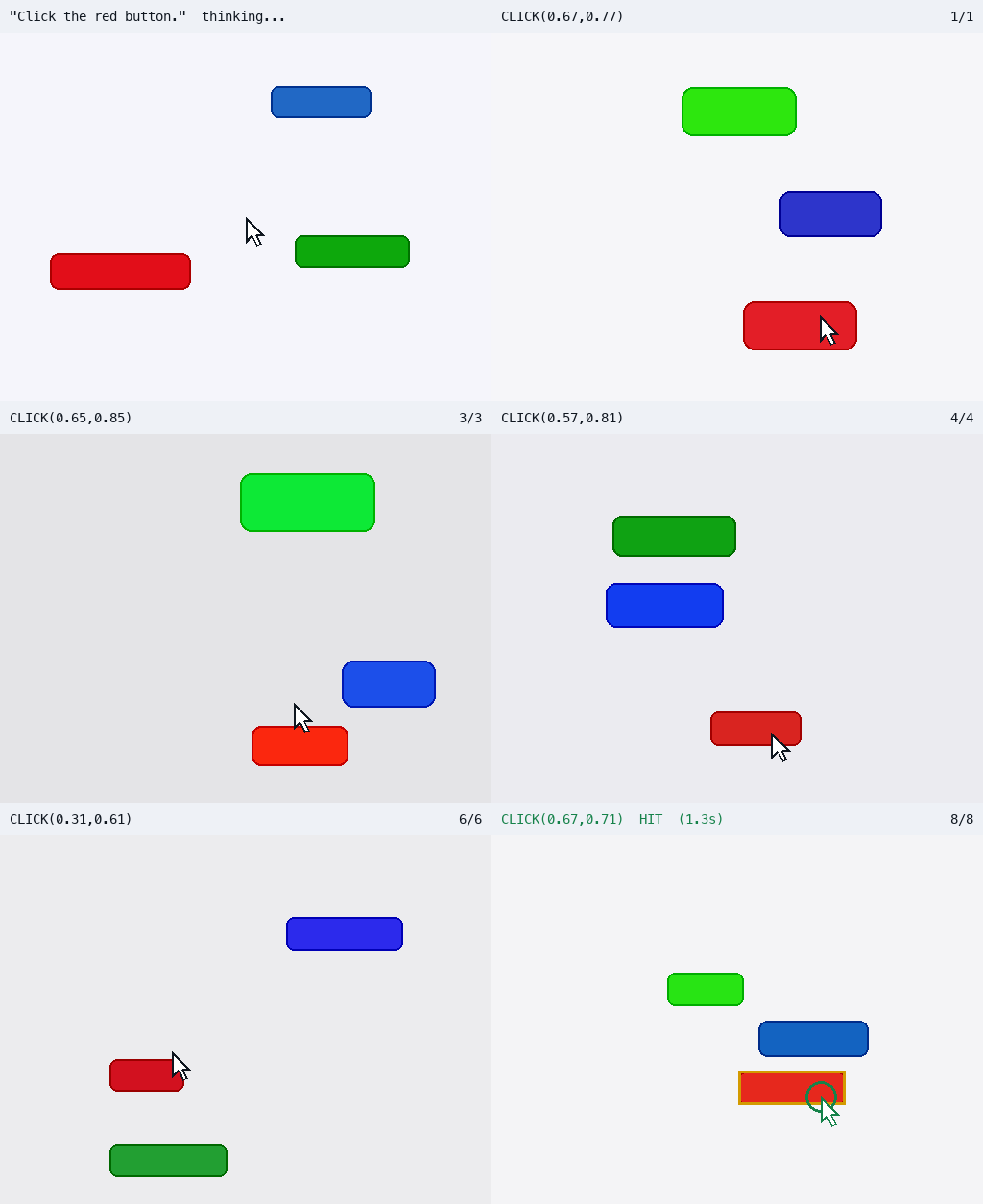
The task: here’s a picture with a red, a green, and a blue button in random spots. Click the red one.
"Click the red button." -> CLICK(0.73,0.42)Coordinates are normalized from 0 to 1 so the model doesn’t care about screen resolution. A click counts as a hit if it lands anywhere inside the red button, because that’s what a real click cares about. Nobody’s grading you on hitting the exact center pixel.
hit = (x_min <= pred_x <= x_max) and (y_min <= pred_y <= y_max)The model: SmolVLM2-500M
I picked SmolVLM2-500M, a vision language model with about half a billion parameters. That’s tiny. Like, “fits in your pocket and still has room for snacks” tiny. The point wasn’t to get the smartest model. The point was to get something small enough that I could train it, break it, and train it again without selling a kidney for GPU time.
Everything runs on Apple Silicon through mlx-vlm.
How bad was it before training?
Very. Measuring the baseline first is the most important step in the whole project, so here’s what the untouched model said when asked to click the red button, across 200 test images:
| What it said | How many times |
|---|---|
3 | 81 |
1 | 35 |
The red button is clicked. | 26 |
Click the red button. | 22 |
Green | 12 |
It said “3” eighty one times. Buddy. What is 3. Who hurt you.
Also my favorite is “The red button is clicked.” Very confident. Did not click anything. Real “I’ll do it later mom” energy.
Base model hit rate: 0%. It never once produced a valid click.
The fix: LoRA
Instead of retraining the whole model, I used LoRA, which glues a few small trainable matrices onto the model and freezes everything else. I trained about 4.3M parameters out of 507M, so roughly 0.86% of the model. The resulting adapter is a 17MB file. The base model never gets touched, so you can always go back to the “3” guy if you miss him.
I wrote the training loop by hand (~250 lines) because I wanted to actually see what’s happening. The core of it is three lines and kind of anticlimactic:
loss, grads = loss_and_grad(model, batch)     # forward + backward
optimizer.update(model, grads)                # Adam on the LoRA params only
mx.eval(model.parameters(), optimizer.state)  # MLX is lazy, make it do the math
Settings, for the nerds (hi):
rank 8, alpha 16, lr 1e-4, batch size 2, 2 epochs
1000 images / batch 2 = 500 steps per epoch, 1000 steps total
The time I thought it worked and it absolutely did not
Before the real run I did a 20 step smoke test. Loss went from 2.62 to 0.60. I was like oh heck yeah, we’re cooking.
Then I looked at what it actually predicted:
target CLICK(0.61,0.65)  ->  'CLICK(0.89,0.20)'
target CLICK(0.32,0.54)  ->  'CLICK(0.89,0.20)'
target CLICK(0.67,0.89)  ->  'CLICK(0.89,0.20)'
Same answer. Every image. It learned the format perfectly and learned nothing about where the button is. It just found one spot on the screen it liked and committed to it. Honestly kind of respect it.
That’s why my eval tracks “how many distinct predictions did you make”, not just hit rate. If the answer is 1 or 2, your model isn’t looking at the picture, it’s just vibing. Low training loss is not success. Only the actual clicking test tells you anything.
The real results
After the full run, on 200 test images the model had never seen:
| Base model | Base + LoRA | |
|---|---|---|
| Hit rate | 0% (0/200) | 92.5% (185/200) |
Produced a valid CLICK() | 0% | 100% |
| Avg distance to button center | n/a | 0.040 (normalized) |
Measured, not vibes. Same 200 images for both, base first, then base + LoRA.
And here’s a fun thing I found in the 15 misses. 7 of them were buttons sitting right at the very top of the screen, and the model clicked just below them. Two more were buttons at the very bottom, and it clicked just above them. So the model is kind of scared of the edges of the screen and pulls its guesses toward the middle. Little guy has edge anxiety. That’s a hypothesis about why, not a proven fact, but the pattern is right there in the data.
How long did all this take?
| Thing | Time |
|---|---|
| Generating 1,200 images | ~1.5 seconds lol |
| Training (2 epochs, 1000 steps) | ~3.5 to 4 hours |
| Eval, base vs LoRA, 400 predictions | ~10 minutes |
| One click at inference | ~1.3 seconds |
So the actual experiment is about one evening. Start training, go eat dinner, watch a movie, come back, it clicks red buttons. Peak life.
3. Hardware stuff (aka my laptop is crying)
The machine:
MacBook Pro, Apple M3 Pro, 18 GB unified memoryTraining ran at ~12 seconds per step with peak memory around 10.7GB. For a 500M model that felt way too slow and way too chunky, so I dug in.
Turns out the language model isn’t the problem. The images are. SmolVLM’s image processor takes my little 512x384 picture, upscales it to around 2048px, and slices it into 13 sub-images. So each training example ends up as ~890 tokens, most of which is the model squinting at 13 crops of three colored rectangles. That’s like reading a picture book with a magnifying glass, one square inch at a time.
The knob that actually matters is this one:
processor.image_processor.size["longest_edge"](Fun fact, image_resize_shape does nothing here because SmolVLM takes a different preprocessing path that ignores it. Ask me how I know.)
What this means for the future:
- 18GB is fine for the 500M model. The 2.2B version is sitting on my disk but I haven’t trained it yet. I expect memory and time to get spicy.
- Real screenshots are way bigger than 512x384, so even more tiles, even more tokens. On a laptop that adds up fast.
- 1.3 seconds per click is fine for a demo. It’s not fine for an agent that has to do 40 actions in a row. Keep that in your back pocket, it matters later for the System 1 / System 2 stuff.
4. Making the data (the fun part, honestly)
No scraping, no labeling, no paying anyone. I just wrote a Python script that draws three rectangles and writes down where the red one is. Because the script draws the buttons, it already knows the answer. Free labels forever. 1,000 train images and 200 test images pop out in about 1.5 seconds.
Each row looks like this:
{"id": "train-000000",
 "images": ["data/train/000000.png"],
 "messages": [{"role": "user",      "content": "Click the red button."},
              {"role": "assistant", "content": "CLICK(0.57,0.64)"}],
 "target": {"color": "red", "bbox": [0.5, 0.56, 0.65, 0.72], "center": [0.57, 0.64]}}
A few decisions that mattered more than I expected:
- No text on the buttons. If the button says “RED” on it, the model just learns to read, which is cheating. Color is the only clue.
- Colors are jittered a bit, so it learns “reddish” and not one exact RGB value.
- Buttons never overlap, with a little gap and a margin from the edges.
- Train and test are generated from totally separate random seeds. I checked: 1,200 unique images, zero overlap. If test images leak into training you’re grading a kid on the exact homework they already copied.
- Train on the center, grade on the whole box. One consistent target to learn, but a fair test.
I also have it spit out a 4x4 preview grid with the target boxes drawn on. Look at it before you train for 4 hours. If the boxes are off, everything after that is a very expensive lie.
5. Next up: System 1 and System 2
Ok here’s where it gets interesting. Clicking a red button is a reflex. You don’t think about it. But “book me the cheapest flight to Boston that isn’t at 5am” is not a reflex. That needs actual thinking.
This is the old System 1 / System 2 idea from psychology:
- System 1: fast, cheap, automatic. “There’s the button, click it.”
- System 2: slow, expensive, deliberate. “Ok, first I need to find the search page, then set the dates, then sort by price, wait, that one’s a red eye, go back...”
Right now my model is pure System 1, but it’s a System 1 that has to type its answer out one token at a time like C, L, I, C, K, (... which is kinda silly for something that should be a reflex.
The plan (this is the plan, nothing below is built or measured yet):
image + goal + history
          |
     shared VLM
          |
     +----+-------------------+
     |                        |
 action head             language decoder
     |                        |
 fast, bounded           slow reasoning,
 choice + confidence     long horizon plans
     |                        |
     +----------+-------------+
                |
          typed action
System 1 is a small head on top of the VLM that picks from a fixed menu of actions (click, scroll, done...) in a single forward pass, and also says how confident it is. No token-by-token typing. I already have a sample of this running with a frozen SmolVLM and a tiny MLP head.
System 2 is the regular text generating path. It thinks out loud, breaks the goal into steps, keeps track of where you are in a long task, and hands sub-goals down to System 1.
The router decides who’s driving. System 1 is confident? Click. System 1 is unsure? Kick it upstairs to System 2. Something like:
decision = system1(screenshot, subgoal)
if decision.confidence > threshold:
    execute(decision.action)                   # fast path, most of the time
else:
    plan = system2(screenshot, goal, history)  # slow path, think about it
    subgoal = plan.next_step
The bet is that most actions in a real task are boring reflexes (click this, scroll that), and only a few moments actually need a brain. So you get speed most of the time and smarts when it counts. This is inspired by TypeSafe’s Jev and System One models, though it’s my own take, not a copy of what they built.
Big honest caveat: a 500M model might just not be smart enough to do useful System 2 reasoning. Generating more words doesn’t automatically mean better thinking. I’ll measure it on tasks that actually need planning and see.
6. Teaching it new stuff, fast
Ok so this part bugs me. Training on a fixed dataset teaches exactly one behavior. Want “click the blue button”? New dataset, new 4 hour run. A human gets “now click the blue one” in about two seconds. So how do you make a model pick up new tricks fast?
The boring answer is still backprop on good labeled data. But one dataset per skill, like I did for the red button, is the slow way to do it. So first: why was the red button slow?
SmolVLM2 was trained on millions of examples of image captioning and visual question answering (per its model card and the SmolVLM paper), so it’s seen a ton of pictures described in words, colors included. And even untrained, it kept talking about “the red button” and colors, it just never pointed anywhere. So my guess is it mostly knew what “red” and “button” mean, and what it actually had to learn was the interface: turning “I see it over there” into CLICK(0.xx,0.yy) as text. That’s a hypothesis, not something I measured. But remember the 20 step smoke test? It nailed the format almost immediately, then needed hundreds more steps to make the digits follow the button. And every one of those steps cost ~12 seconds because of all the image tiles. So my bet is most of those 4 hours went into learning to point and paying for image tokens, not learning “red”.
Which gives me a bunch of ideas. None of these are measured yet, they’re bets:
- Reuse the pointing skill. Start from the red button model and train it on “click the blue button” or “click the button below the green one”. If pointing carries over, a new skill should need a small fraction of the steps. This is my main bet.
- Train on lots of instructions at once. One dataset with many colors, positions, and relations, so the model learns to follow instructions instead of memorizing one target. Then new tasks are mostly combos of stuff it already knows. Keep some old tasks mixed into every batch so learning blue doesn’t make it forget red.
- Make each example cheaper. Fewer image tiles per example. Or freeze the whole VLM, compute its features once, and only train a tiny action head on top. That could be seconds per run instead of hours, but nobody knows yet if accuracy holds up.
- Make each example count more. Only train on the stuff it gets wrong, and use a checker as the teacher when there’s no label. That’s the flywheel, more on it in the next section.
- Learn from you, live. You correct a bad click and it takes a training step right then. Mixing in old examples is what keeps it from overfitting to whatever you clicked last.
- No training at all. Show it a few examples in the prompt and let it copy the pattern. Honestly a 500M model is probably too small for this to work well. Bigger models are way better at it.
And since “a bet” isn’t a result, here’s how I’d test the main one. Time how long it takes to hit 90% on “click the blue button” three ways:
task: "Click the blue button."    goal: 90% hit rate

(a) from scratch                          -> steps? minutes?
(b) start from the red button model       -> steps? minutes?
(c) (b) + keep some red examples mixed in -> steps? minutes?

after: does red still hit ~92.5%?
Then check that red still scores around 92.5% afterwards. If (b) or (c) gets to 90% in something like 100 steps instead of 1000, that’s evidence for “learn the interface once, add skills cheaply”. If not, back to the drawing board. Either way it’s a fun one.
7. The data flywheel (or: how to stop making datasets by hand)
Even with all of that, someone still has to make the data. Unless the model makes it for you.
The flywheel idea:
   model tries stuff
         |
         v
   check if it worked     <---- free if I generated the scene,
         |                      or a human says "no, THERE"
         v
   keep the failures
         |
         v
   train on the failures
         |
         v
   better model tries harder stuff  ---> (back to the top)
I’ve written a few pieces of this, but none have been run to convergence yet, so no numbers to brag about:
Online SFT with hard mining. Generate a scene, check if the model already gets it right, and only train on the ones it gets wrong. At 92.5% the model already nails most scenes, so most of a normal training step is wasted re-teaching stuff it knows. Hard mining throws away the easy ones.
scene = generate_scene()              # generator knows the answer
if model_hits(scene):
    continue                          # already gets it, skip
train_step(scene)                     # only learn from mistakes
RL with a checker. Nobody tells the model the answer. It makes a few guesses, I check which ones landed in the box, and reward those. The cool part: this works for tasks where you can check the result but don’t have a label. Small catch: if the model starts at 0% (hi, “3” guy) there’s nothing to reward, so you need the SFT model as a starting point.
clicks = [model.sample(scene) for _ in range(4)]       # a few guesses
rewards = [1.0 if inside(c, red_box) else 0.0 for c in clicks]
reinforce(clicks, rewards)                             # more of what landed
Live weights. This one is just a plan right now but I’m so excited about it. The model predicts, you click where it should have clicked, it takes a gradient step right there, and the next prediction comes from the updated model. You’d literally watch it learn in real time. Humans become the labelers just by using the thing.
Put those together and the loop is: the agent does real work, its failures get caught (by a checker, by a human, by the task just not finishing), and those failures become tomorrow’s training data. The more it’s used, the better it gets. That’s the dream anyway.
8. Scaling this up
Stuff I want to do next, roughly in order of “probably works” to “hope”:
- Check what it already knows. Before training anything else, quiz the untrained model: “what color is the button on the left?” on a few dozen scenes. Takes a minute. If it gets the colors right, my “it already knew red” guess from section 6 becomes an actual result. If not, the whole “learn the interface once” plan needs a rethink.
- Run the blue button test. The from scratch vs start from red vs start from red plus some red examples mixed in comparison from section 6. This is the big one. It tells me whether new skills are cheap or every skill costs another 4 hours.
- More instructions, one dataset. “Click the button below the green one”, “click the biggest button”. Cheap to generate, and it tells me if it’s actually reading the instruction or just hunting for a color.
- Make training cheaper. Lower
longest_edgeso each image is fewer tiles, and try the frozen VLM plus tiny action head setup. See how much faster it gets before accuracy drops. Free speed, maybe. - Try the 2.2B model. Already on disk. Same experiment, see if bigger brains fix the edge anxiety.
- Real screenshots. Multiple themes, resolutions, tiny buttons, text heavy pages. There are public datasets of real GUI interactions (like the Aguvis ones) to mix in with the synthetic stuff.
- Multi step tasks. A little sandbox with 3 to 5 step tasks, a deterministic reset, and a checker that says “yes you finished” or “no you did not”. This is the real next milestone. Not full desktop control. Just one tiny task you can’t do in one click.
- Real GPUs. At some point the MacBook taps out. Training for hours per experiment kills iteration speed, and iteration speed is everything.
- Safety rails before the real mouse. I have a script that moves my actual macOS cursor to wherever the model points, and it deliberately does not click. Before it clicks anything real it needs allowlists, bounds checks, confirmations for scary actions, logs, and a big red kill switch. (A red button, even. Full circle.)
9. So what did I learn
- A 500M model on a laptop can learn screen grounding for a toy task in one evening: 0% to 92.5%.
- Always measure the baseline first. Otherwise 92.5% means nothing.
- Low loss can lie to your face. Look at the actual predictions.
- On small VLMs, image tokens eat your compute, not the language model.
- Synthetic data is amazing when your generator knows the answer.
- The expensive part probably isn’t the concept, it’s the interface: learning to point. That’s still a hypothesis. But if it holds, the first skill is the pricey one and every skill after it should be way cheaper. That’s what I’m testing next.
- Clicking a button is the easy part. Knowing which button to click, 40 steps into a task, is the actual hard problem, and that’s where System 2 and the data flywheel come in.
Anyway. It clicks red buttons now. I’m currently fine-tuning it to do more than that, so stay tuned. Will update the details here soon!